SCORM content development involves the use of SDLC methodologies, authoring tools, multimedia resources, assessments, and SCORM packaging standards to create training content that communicates effectively with a learning management system (LMS). Through effective SCORM content development, organizations can deliver digital training that is scalable, trackable, and reusable across different LMS platforms. Beyond the technical requirements, successful SCORM content development also requires an understanding of how learners interact with online learning environments to create engaging and effective learning experiences.
What Is SCORM and Why Is It Important for E-Learning?
SCORM (Sharable Content Object Reference Model) represents a collection of technical standards for packaging, delivery, and tracking e-learning content across LMSs. Created by ADL (Advanced Distributed Learning), SCORM defines how courses interact with the LMS, such as how the status of course completion, assessment scores, and learner progress are recorded and communicated. The most popular ones are SCORM 1.2 and SCORM 2004.
The importance of SCORM is that it enables content portability: A course developed once can be used on any SCORM-compliant LMS without having to rebuild or re-engineer the content. Compliance training, professional development, or onboarding curricula are among the scenarios where SCORM compatibility is valuable for organizations, as it allows them to capture, store, and access all learner activity data for reporting and auditing purposes.
What Does SCORM-Compliant Training Content Mean?
The digital learning package is a SCORM-compliant learning package that adheres to ADL’s technical specifications to communicate back to a host LMS learner information (e.g., assessment scores, time spent, completion status) via the SCORM API. Compliance is the ability to have the content include the proper manifest file (imsmanifest.xml), start up properly in a SCORM runtime environment, and return the information to the LMS in the proper format.
Understand that SCORM compliance is more than just packaging. Development of content should be based on a structure that gives a clear indication of the completion rules, passing scores, and tracking logic prior to content development. One of the most frequently occurring compliance problems is content that starts and shows up fine, but fails to report a proper completion status to the LMS, which is usually due to incorrect configuration of completion triggers or lack of API communication calls in the authoring tool’s settings.
How Do E-Learning Developers Plan SCORM Content Before Development?
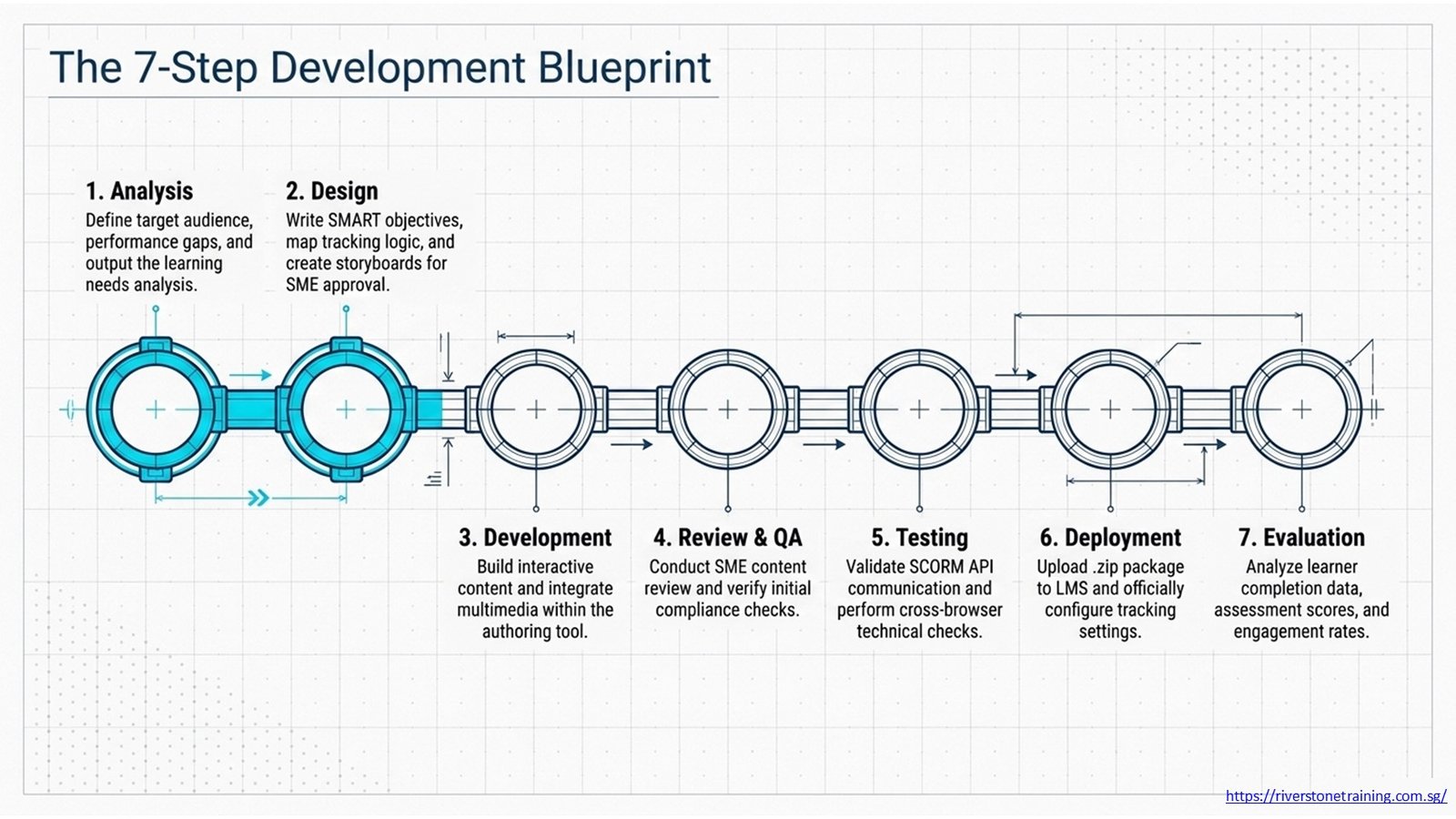
The most important aspect of SCORM content development is planning. Developers start by conducting a learning needs analysis to determine the target audience, gaps in performance, and measurable learning outcomes. From this point, a learning course blueprint or content outline will outline the learning journey, identifying the modules, sections, and the logical sequence of learning. The planning step sets up how the SCORM tracking will work, such as what constitutes ‘completion’ and how assessments are considered.
The blueprint phase is followed by Storyboarding. A storyboard outlines all the screens in the course, including text content, visuals, interactions, audio or video prompts, and the way users navigate from one screen to the next on the course within each screen or scene. When storyboards are well written, subject matter experts (SMEs) can look them over and approve content before the first slide is created in an authoring tool, and thus, save on costly revisions during the development process.
Table 1: SCORM Content Development Process
| Development Stage | Key Activities | Output |
| Analysis | Define audience, goals, and performance gaps | Learning needs analysis report |
| Design | Write learning objectives, plan structure, create storyboards | Course blueprint and storyboard |
| Development | Build content in the authoring tool, add multimedia and interactions | Draft SCORM course package |
| Review and QA | Content review by SMEs, usability testing, and SCORM compliance check | Revised and approved content |
| Testing | SCORM API validation, LMS upload test, cross-browser check | Verified SCORM package (.zip) |
| Deployment | Upload to LMS, configure tracking settings, assign learners | Live course on LMS |
| Evaluation | Analyze learner data, completion rates, and assessment scores | Performance and engagement report |
How Are Learning Objectives Incorporated Into SCORM Content?
Learning Objectives are statements that specify what the learner will be able to do or know at the end of a course or module. The objectives are embedded within the design of the SCORM and form the basis for all decisions regarding content, interactions, and assessments in SCORM development. Clear objectives are written in terms of observable, measurable results and adhere to the SMART model (Specific, Measurable, Achievable, Relevant, and Time-bound).
Another advantage of SCORM 2004 is that it enables objective-level tracking so that developers can report back on what the learner did after each objective in the course, not just on the overall course completion. This is especially useful in competency training programs, where each organization must keep track of the learning of individual skills or knowledge domains. In the authoring tool’s SCORM settings, developers set up the objective tracking before the course package is published.
What Authoring Tools Are Commonly Used for SCORM Content Development?
SCORM is created primarily using e-learning authoring tools. The most popular tools – Articulate Storyline, Articulate Rise, Adobe Captivate, iSpring Suite and Lectora Inspire all generate SCORM-compliant packages straight from their export menus. There are advantages to each tool: Storyline is best suited for custom interactions and branching scenarios; Rise is best suited for a more mobile-first, responsive design; Captivate is best suited for software simulations or accessibility-compliant courses.
The selection of an authoring tool will be determined by the type of content, the level of expertise of the team authoring, budget, and requirements of the LMS. A uniform set of tools makes it easy for quality assurance and version control, and for developers to get up and running quickly with the organization’s online training content. A lot of professional SCORM content development teams choose to use a primary authoring application in conjunction with video editing and graphic design software to create professionally appealing, production-quality training materials.
Table 2: Common Authoring Tools and Their SCORM Capabilities
| Tool / Platform | Primary Use | SCORM Output |
| Articulate Storyline 360 | Interactive slides, scenarios, and branching | SCORM 1.2 and 2004 |
| Articulate Rise | Responsive web-based courses | SCORM 1.2 and 2004 |
| Adobe Captivate | Software simulations, responsive design | SCORM 1.2, 2004, and xAPI |
| iSpring Suite | PowerPoint-to-SCORM conversion, video integration | SCORM 1.2 and 2004 |
| Lectora Inspire | Compliance training, accessible course design | SCORM 1.2, 2004, and AICC |
| Camtasia | Screen recording, e-learning video production | MP4/video asset for authoring tools |
| Adobe Premiere Pro | Professional video editing for e-learning content | MP4/video asset for embedding |
How Is E-Learning Video Content Integrated Into SCORM Courses?
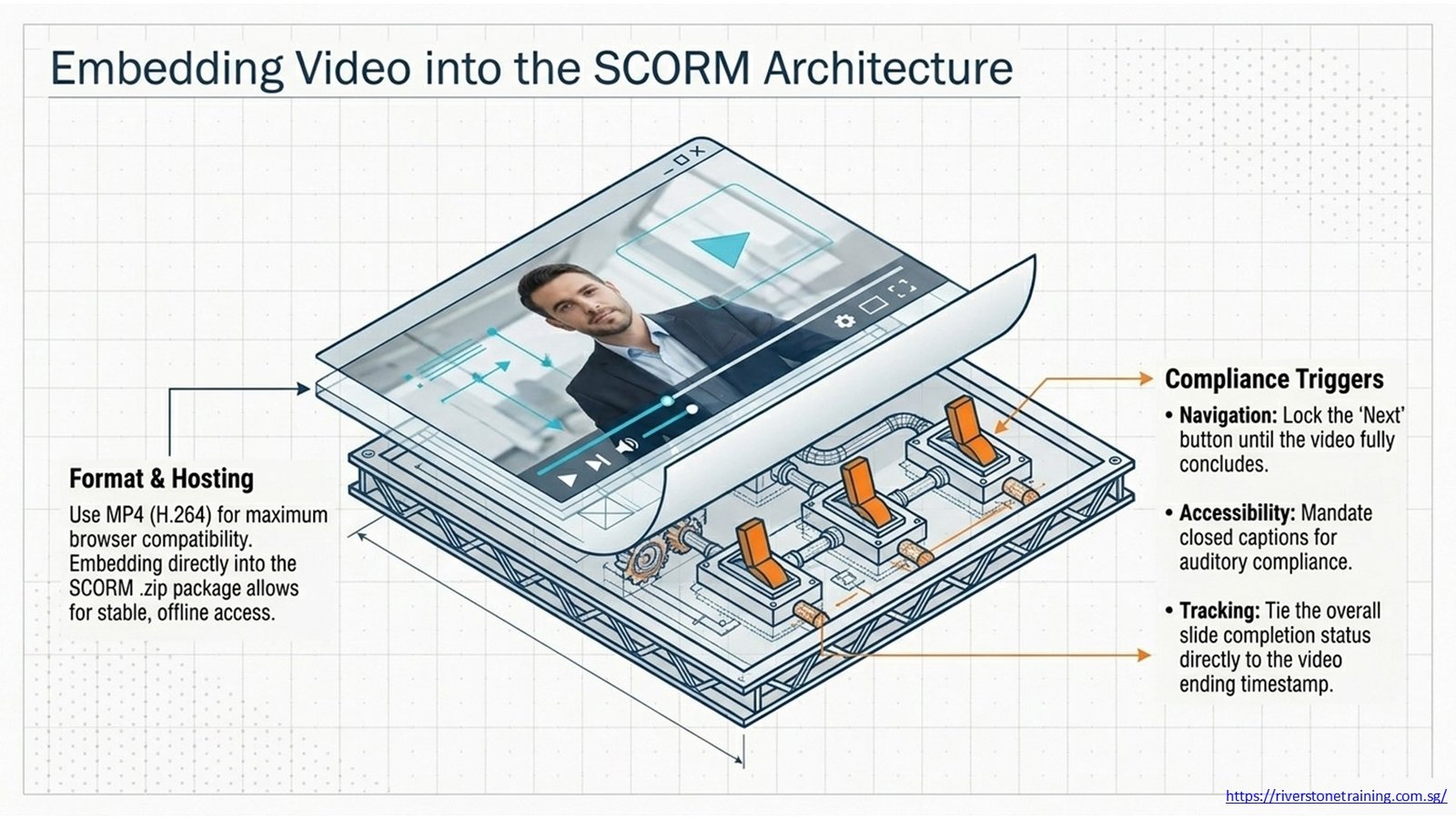
E-learning video content is embedded within SCORM courses in the authoring tool. Video is created by the developers in a separate process: software tutorials are created with screen recording software, such as Camtasia, and the talking-head or scenario-type videos are created by professional video production. The resulting video files are then embedded in the relevant slides or scenes within the SCORM package. The common video formats include MP4 (H.264), which can be used in most browsers and LMSs.
Options for video integration decisions are: Lock the Next button until the video has ended, closed captions (for accessibility compliance), external hosting, or embedding the video in the SCORM package. Compliance organizations that utilize e-learning video content typically embed the video right into the SCORM package so that it can be accessed offline and played back in all LMS environments.
How Do Developers Create Interactive Learning Experiences Within SCORM Packages?
Branching scenarios, drag-and-drop activities, clickable hotspots, simulations, and decision-making exercises are all examples of interactive learning experiences in a SCORM package. These interactions get learners to engage in the text rather than passively read it, which enhances the retention of information and the transfer of skills. Authoring Tools offer libraries of pre-built interaction templates, thus enabling developers to build complex interactions without custom coding.
A powerful interactive training format for workplace training is branching scenarios. Developers play a real scenario, such as a challenging interaction with a customer, a compliance decision under stress, and give learners several options to select from. Every option has a consequence and a next scene, which gives feedback on the quality of the learner’s choice immediately. Everything is embedded in the SCORM, and all the navigation data is recorded by the LMS.
How Are Assessments Built Into SCORM-Compliant Training Programs?
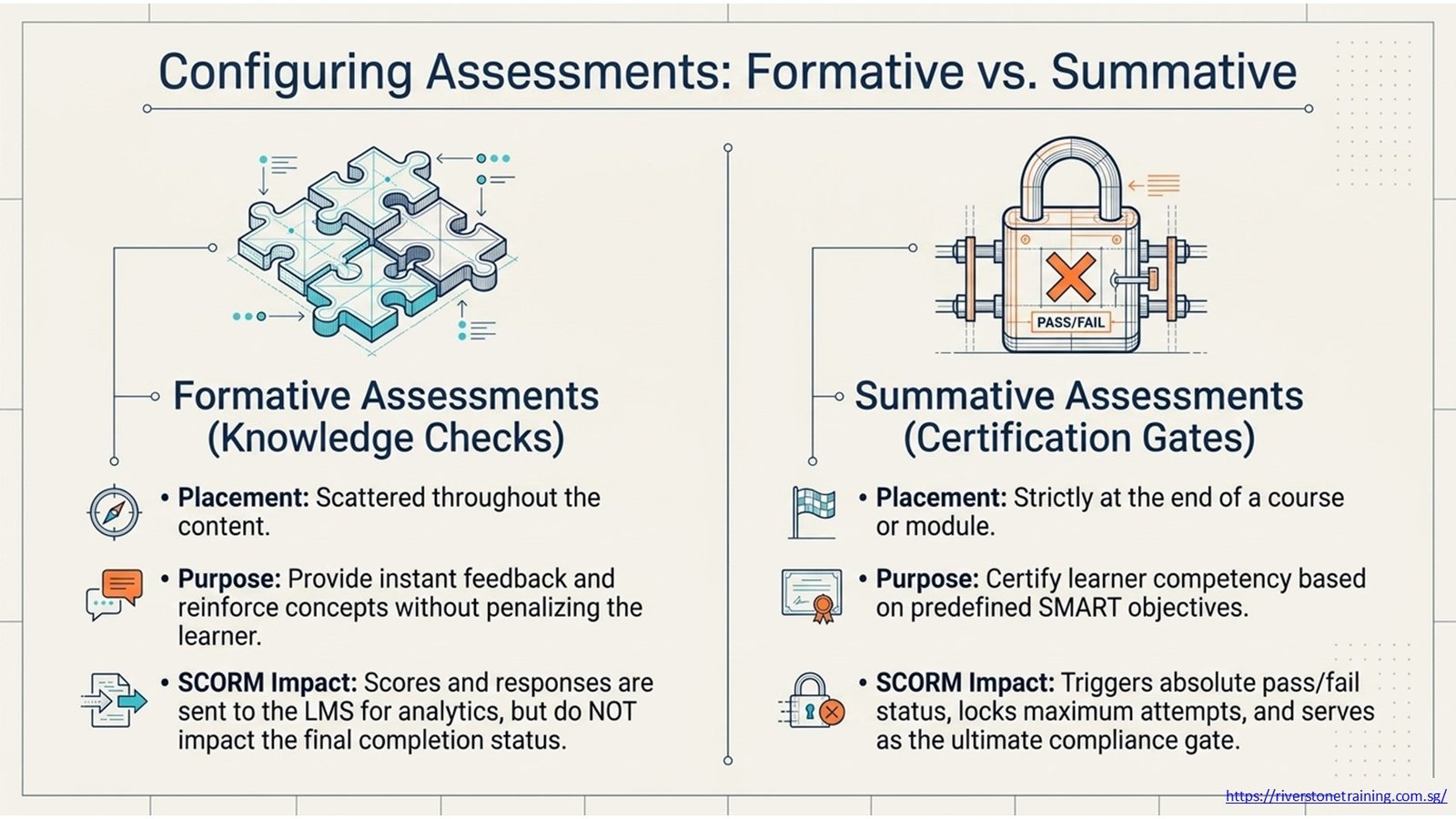
In SCORM courses, assessments are created with the built-in quiz feature of the authoring tool and sent to the LMS using the SCORM API. The common types of questions are multiple choice, multiple response or selection, true/false, matching, and sequence ordering, and fill-in-the-blank. Passing score thresholds, Maximum number of attempts, Question randomization, and Feedback display settings are all set before publishing the SCORM.
Formative assessments — knowledge checks scattered throughout the content — give instant feedback and reinforce learning, but don’t impact the completion status. With the exception of compliance and professional development training, summative assessments (assessments at the end of a course or an end of a module) are the main way in which competency is certified as passed or failed. Both types are part of most well-designed SCORM courses, providing a balance of learning support and learning measurement.
How Does SCORM Communicate Learner Progress to an LMS?
While the learner is using the course, SCORM provides learner progress information through JavaScript API calls in the background. A package of data is sent to the LMS by standardized API functions when the learner completes a slide, answers a question, or exits the course (SCORM 1.2) or when the learner completes a slide, answers a question, or exits the course (SCORM 2004). This data is stored and processed in the LMS for reporting purposes.
Data elements conveyed are: completion status (completed, incomplete, passed, failed, not attempted); score (raw score, minimal score, maximal score, scaled scores); session time; and suspend data to record bookmarking. Developers should make sure that their authoring tool’s SCORM output is set to invoke these API functions at the appropriate times during the learner’s experience, including when the course is completed; this is known as the Finish/Terminate call, which saves and commits all learner information to the LMS when the course concludes.
Table 3: SCORM Tracking Capabilities and Their Value
| Tracking Feature | What It Measures | Value to Organizations |
| Course Completion Status | Pass, fail, incomplete, or not attempted | Confirms learner compliance with required training |
| Assessment Score | Percentage or raw score on knowledge checks | Measures learning effectiveness and retention |
| Time Spent in Course | Total and per-slide time on content | Identifies engagement and potential drop-off points |
| Learner Progress | Slides viewed, sections completed | Tracks partial completion for multi-session access |
| Learner Responses | Individual quiz answers (SCORM 2004) | Supports targeted remediation and content revision |
| Attempt Count | Number of times the learner has attempted the course | Monitors repeated attempts for certification compliance |
| Suspend Data | Bookmarks learner position on exit | Enables resumption from the last viewed point |
How Do Developers Test SCORM Compatibility Before Deployment?
To test for SCORM compatibility, the course package is checked to see whether it meets the requirements of the SCORM standard before it is uploaded to a production LMS. The most popular free testing tool is SCORM Cloud (from Rustici Software), a SCORM-compliant runtime environment that imitates LMS behavior and logs the API communication in real time. Developers upload the .zip package, open the course, finish the course, and check that the appropriate status and score are generated in the test dashboard.
In addition to SCORM Cloud, a developer should also try the course in a staging environment on the LMS being used, in various browsers (Chrome, Edge, Firefox, Safari), and if the course is mobile-friendly, on mobile devices. Typical problems that are found during testing occur when the courses report completion when there are no page triggers at the end of the course, when the video will not play because of missing codecs, or when the branching logic leaves a learner with no way to complete the course.
What Common Mistakes Affect SCORM Compliance?
The most common SCORM compliance error is a wrong completion trigger. When an authoring tool is configured to award completion for a quiz, but the quiz is not required, some learners will leave without ever completing the course – even if they have seen all of the content. Developers need to make sure that completion logic is exactly as it is intended based on the instructional design and test all the possible paths learners can take through the course to ensure completion triggers are firing as intended.
Other typical errors are uploading to the wrong version of SCORM for the host LMS (some LMS systems do not fully support SCORM 2004), putting large uncompressed video files that cause delays in loading and browser timeouts, and not configuring the course to resume from the last location viewed (suspend data). These problems can be prevented by proper pre-deployment testing and by following a standardized quality assurance checklist.
How Do Organizations Use SCORM Content for Compliance and Professional Training?
Compliant training that meets standards like workplace safety, data protection, anti-bribery, and financial regulations is deployed by organizations because SCORM can be used to track who has done the mandatory training and when. For regulated industries, such as training records in industries that have to be kept and made available when requested by auditors or regulators, this is even more critical. SCORM e-learning video content focused on compliance can help organizations train huge geographically dispersed workforces without having to coordinate face-to-face training.
In addition to compliance, SCORM is popular for leadership, finance, sales, and technical skills training programs. A learning path with a specific role can be set up, and progress monitoring can be done across a multi-module learning path, with automatic awarding of completion certificates through the LMS. Self-contained, SCORM packages are portable, so training libraries can be updated centrally, and the more recent training packages can still be deployed throughout the organization without disrupting the learner or losing the history of their training.
Table 4: E-Learning Content Components and Their SCORM Integration
| Content Component | Learning Function | SCORM Integration |
| Video (Talking Head / Screen Record) | Explanation, demonstration, and modeling | Embedded in the slide, completion can trigger progress |
| Knowledge Check Quiz | Formative assessment, concept reinforcement | Scores and responses sent to LMS via SCORM API |
| Branching Scenario | Decision-making practice, application of skills | Learner path data tracked across branches |
| Infographic / Visual Slide | Concept explanation, data presentation | Viewed as a slide within the SCORM package |
| Simulation / Clickable Demo | Software or process practice | Interaction data captured in the SCORM package |
| Downloadable Job Aid | Reference tool for post-training performance | Linked from SCORM course; download tracked |
| Final Assessment | Summative evaluation, certification gate | Pass/fail status and score reported to LMS |
How Can SCORM Content Improve Learner Engagement and Tracking?
The use of well-structured instructional design, multimedia features, interactive activities, and realistic application scenarios makes the learning content of SCORM more effective in engaging students. Courses that are based on text-heavy slides tend to have lower completion rates than courses with video, branching scenarios, and practice activities. Engagement design is achieved through story, variety, characters that are relatable, and a gradual increase in difficulty to prevent drop-off, especially in self-paced online learning.
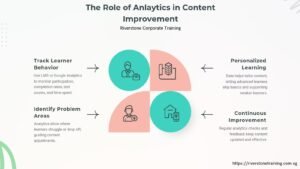
When it comes to tracking, SCORM helps organizations know what’s causing learners to drop off — which slides have a higher drop-off rate, which question is the most commonly missed, and which module is the longest. This learner data serves as concrete evidence for L&D teams to use when revising content—content developers can use this information to enhance weaker content, make complex content more understandable, and change the level of difficulty on assessments based on actual learner performance data instead of assumptions.
What Skills Are Required for Successful SCORM Content Development?
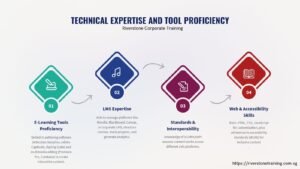
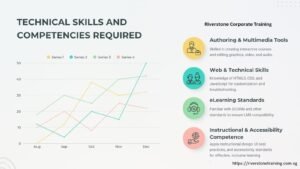
The development of successful SCORM content requires a mix of instructional design, technical, and creative skills. The professional base is instructional design skills: how to write clear learning goals, how to organize content in a logical fashion, how to develop assessments that will measure the right outcomes. Technical skills include having at least one authoring tool and knowledge of the behavior of the SCORM API, administration of the LMS, and a basic understanding of troubleshooting issues of compatibility and tracking.
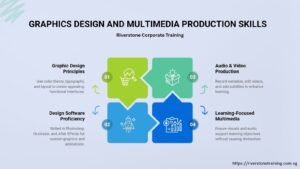
The quality of the learner experience for the finished course is determined through creative production skills: writing an engaging script, creating clear visual layouts, editing videos, and audio content. Multimedia production professionals, instructional design professionals, and technical SCORM development professionals are among the most valuable professionals on any L&D team, as they develop all three skill areas. Organizations developing internal e-learning capability will find that investing in training for these skill areas is the best use of training resources for high-volume or high-priority training.
How Is SCORM Content Development Applied in Real Workplace Training Programs?
In the real workplace, SCORM content is applied throughout the entire employee lifecycle, including when they are first hired, to meet compliance and certification requirements, for product training, for leadership development, and for performance enhancement initiatives. A typical program could be a mixture of SCORM e-learning, virtual live sessions, and on-the-job assessments, etc., with the LMS being able to recognize completion of SCORMs as a requirement to progress to the next stage.
Business units with training programs in several countries or organizations located across different sites can especially benefit from the portability and tracking capabilities of SCORM. A single SCORM course package can be deployed to thousands of learners at once, and individual progress can be tracked independently for each learner and reported at the team, department, or organization level. This is a scalable feature that makes SCORM-based development a clear choice for enterprise training programs where having consistent learning content and an audit trail of learner completion is critical.
Frequently Asked Questions
What is SCORM in e-learning?
SCORM (Sharable Content Object Reference Model) is a collection of technical guidelines that establishes communication between e-learning content and LMSs, as well as the way it is packaged. It allows for automatic tracking and reporting of course completion, assessment scores and learner progress. The power of SCORM is that content created in one authoring system can be published on any SCORM-compatible LMS without needing to be changed.
Why is SCORM compliance important?
The key importance of SCORM compliance is that it standardizes the training content to run seamlessly on various LMS platforms and accurately track learner data. For compliance-driven organizations, SCORM allows you to have a record of who completed the mandatory training and when it was completed in order to create an auditable record. For the L&D team, it opens possibilities to roll out self-paced learning on a massive scale without manual tracking, which saves administration time and makes reporting easier.
Can video-based courses be SCORM compliant?
Yes. E-learning videos can be created with authoring tools like Articulate Storyline, iSpring Suite, or Adobe Captivate, then embedded in a SCORM package. The video is embedded in the Course Package or an external video source, and the slide structure is tracked using SCORM. Completion can be based on showing a video, a later knowledge check, or an end-of-unit quiz (all of which are set up in the authoring tool).
What LMS platforms support SCORM?
Most of the commercial and open-source LMS systems are compatible with SCORM 1.2 and SCORM 2004, such as Moodle, TalentLMS, Cornerstone OnDemand, SAP SuccessFactors Learning, Docebo, iSpring Learn, and Blackboard. In choosing an LMS, companies need to make sure it supports the version of SCORM they need and that it supports xAPI (Tin Can) for more sophisticated tracking features and capabilities beyond SCORM.
How do developers test SCORM packages?
Developers use SCORM Cloud, a free online SCORM testing platform, for testing SCORM packages for their compliance with the SCORM standards. Developers use SCORM Cloud, a free online tool that gives them a standard-compliant runtime environment for testing SCORM behavior, to test SCORM packages. The course is uploaded as a .zip file, launched, completed, and the API communication log is checked to ensure the correct completion status and score are reported. Final testing also takes place in a staging environment on the target LMS before it is published to learners.
What is the difference between SCORM 1.2 and SCORM 2004?
The most common version is SCORM 1.2, which can be used by almost all LMS platforms. SCORM 2004 added more granular reporting (at the objective level and response data for the learner), better sequencing and navigation rules, and a more detailed data model. While SCORM 2004 is more widely supported by LMS than 1.2, it is not as widely supported as 1.2, which has fewer LMS supports. Most e-learning developers stick to the SCORM 1.2 standard for the widest possible compatibility, and only implement the SCORM 2004 standard if the LMS is specifically capable of supporting it.
Conclusion
The e-learning developers are responsible for developing learning content that is compatible with the LMS, providing the instructional design discipline, expertise in authoring tools, the skills to produce multimedia, and knowledge of how SCORM packages communicate with the LMS. The training product created during each phase of development—from learning needs analysis to storyboarding, content production, testing, and LMS deployment—is learner-engaging and organization-measurable.
The development of effective SCORM content ensures a scalable training program that can be delivered to many employees in a large organization without losing any consistency, accurately tracks every learner’s progress to ensure compliance and performance reporting, and is portable between LMS systems as technology changes. Good SCORM courses tend to incorporate high-quality e-learning video material, interactive scenarios that mimic real-life situations, and a well-designed assessment.
Strong SCORM content development skills are a valuable skill for an instructional designer, e-learning developer, or any L&D professional. Those organizations that develop in-house e-learning expertise – or partner with a specialist development partner – will be better prepared to quickly meet training needs, minimize the need for in-person training, and collect actionable learner data that can be used for ongoing training improvements.
Table 5: SCORM Content Development — Summary of Key Areas
| Development Area | Key Skill | Business Outcome |
| Instructional Design | Learning objectives, storyboarding, content flow | Structured, goal-aligned learning experiences |
| Authoring Tool Development | Building interactive SCORM courses | Engaging, self-paced training programs |
| E-Learning Video Production | Scripting, recording, and editing video content | High-retention multimedia learning |
| Assessment Design | Quiz and scenario construction | Measurable knowledge and skill verification |
| SCORM Packaging and Testing | API validation, LMS compatibility check | Reliable course delivery across platforms |
| LMS Tracking Configuration | Completion rules, score thresholds | Accurate learner data for reporting and compliance |
| Ongoing Evaluation | Data analysis, content revision | Continuously improved training effectiveness |