SCORM and xAPI Standards for E-Learning
In the fast-moving, tech-driven world of work, companies from all sectors are pouring more and more resources into the development of e-learning content to train their employees, induct new staff and ensure regulatory compliance. Two technical standards that most e-learning professionals will come to know well early in their careers are at the core of this trend: SCORM and xAPI e-learning. Knowing how they work and when to use them is vital for anyone creating, implementing or managing e-learning initiatives.
The Sharable Content Object Reference Model (SCORM) has been the go-to e-learning interoperability standard since the turn of this millennium. It is a specification for how e-learning content interacts with a Learning Management System (LMS) and is still used to run many corporate training libraries around the world. The Experience API (xAPI) or Tin Can API was designed as an alternative to address some of the known issues with SCORM. These two specifications have a profound impact on how online learning content is built, tracked and reported.
This article is written for early to middle career learning professionals and instructional designers, and those who are new to or making the switch into learning and development. Whether you are selecting authoring tools and preparing to develop your first course, or you are struggling to wrap your head around how to best manage LMS e-learning content effectively, this should give you some context, process and perspective on how to make the best decisions.
Understanding SCORM: The Foundation of E-Learning Interoperability
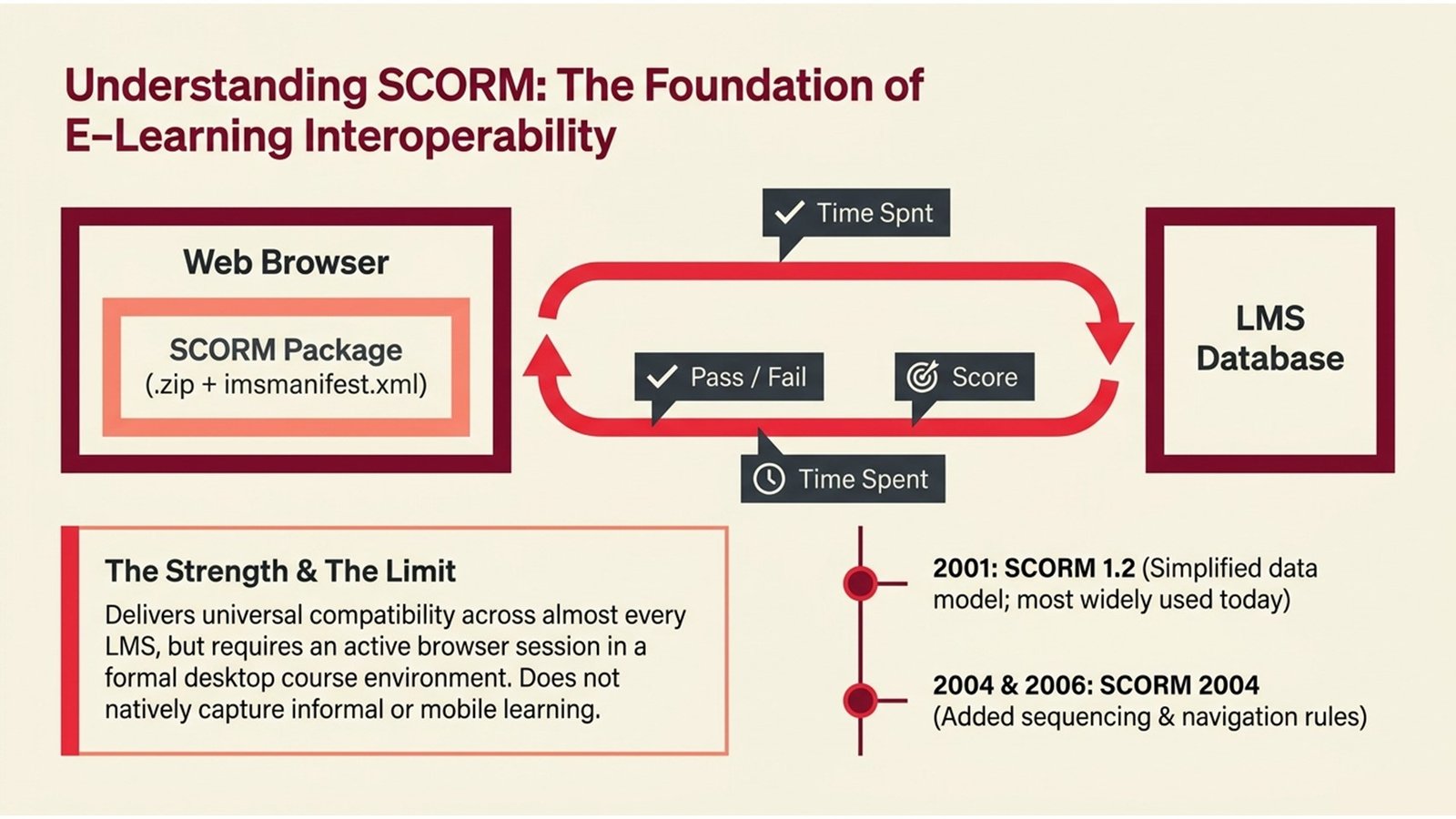
The Shareable Content Object Reference Model (SCORM) was created by the Advanced Distributed Learning (ADL) Initiative, a project funded by the United States Department of Defence and was first released in 2001. In essence, SCORM and xAPI e-learning conversations inevitably start with SCORM, as it sets the standard for how to package learning content and how to report back to the LMS on completion, score and progress of the course. The most common version is SCORM 1.2, but SCORM 2004 was subsequently released with additional features such as sequencing and navigation rules.
When you export a course that has been built as a SCORM package, you get a ZIP file of the course content and an XML file (imsmanifest.xml) that the LMS uses to load and launch the course. The LMS then reports a predetermined list of learning data points on the course – most commonly completion status (passed or failed), the learner’s score and the time spent in the course. This simplicity is a major advantage of SCORM: it’s supported by almost every LMS, and a SCORM course authored in one tool should be able to be imported into any LMS that supports SCORM.
But it has its drawbacks. SCORM relies on an open browser session and was designed in an era of learning that took place only within formal courses on a desktop computer. It does not inherently support informal activities, mobile learning or learning outside the LMS. These limitations provided the impetus for the development of xAPI, and are important to understand when developing a long-term strategy for e-learning content development.
Table 1: SCORM Version Comparison
| Version | Release Year | Key Feature | Common Use Today |
| SCORM 1.1 | 2001 | First formal release | Rarely used |
| SCORM 1.2 | 2001 (revised) | Simplified data model | Most widely used |
| SCORM 2004 (3rd Ed.) | 2006 | Sequencing & navigation | Some enterprise LMS platforms |
| SCORM 2004 (4th Ed.) | 2009 | Bug fixes & clarifications | Limited adoption |
What xAPI Brings to the Table
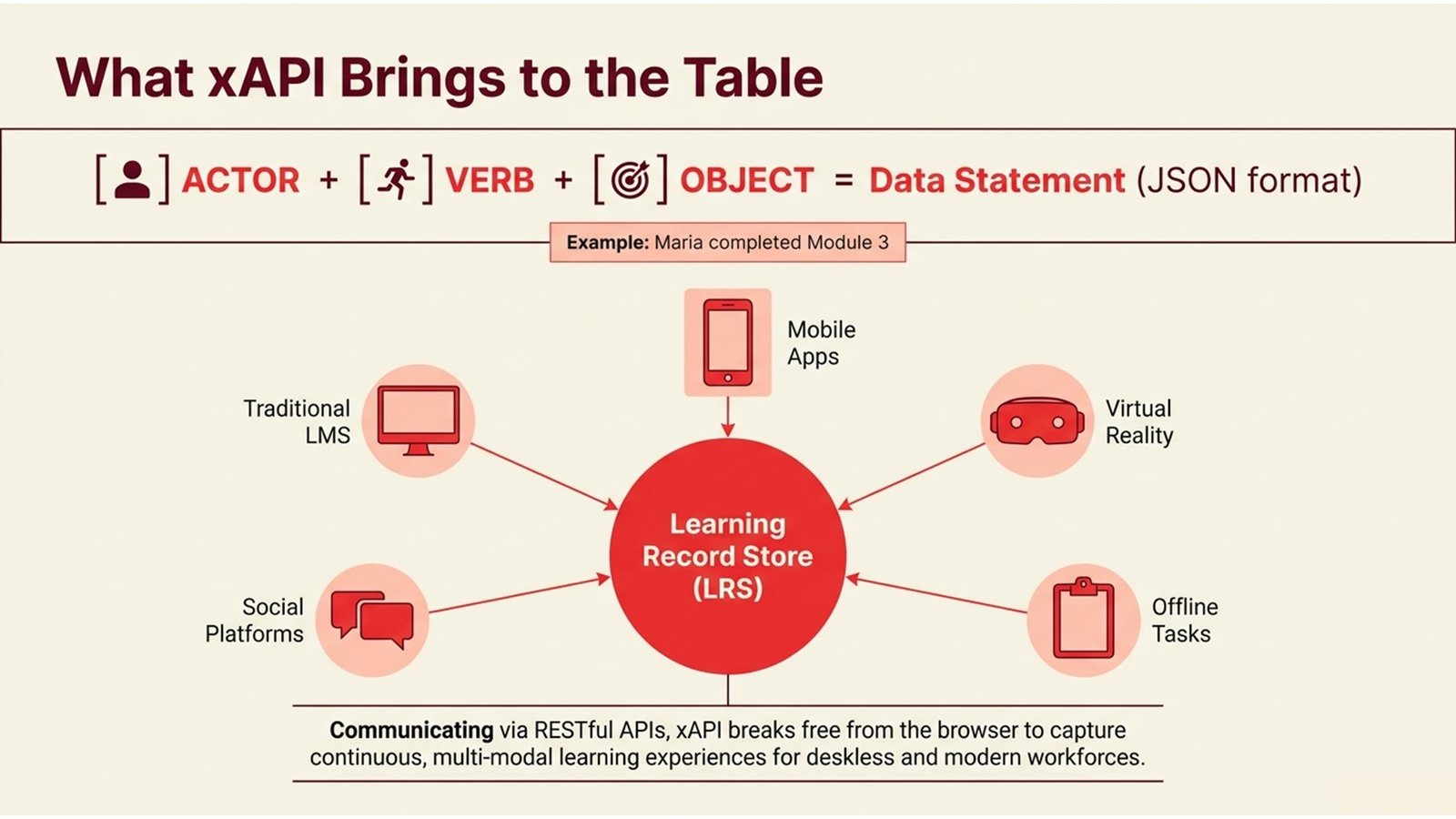
ADL launched xAPI in 2013 as the successor to SCORM to overcome key shortcomings of the latter. The biggest change brought about by xAPI is the introduction of the statement model. All learning activities (whether conducted within or outside an LMS) are captured in a basic “Actor → Verb → Object” statement. For instance: “Maria completed Module 3” or “Ahmed viewed the safety training video,” or “The team achieved 85% on the quarterly test.” The statements are stored in a special database, known as the Learning Record Store (LRS).
This design enables SCORM and xAPI e-learning to be tracked in a variety of ways. xAPI allows organisations to track learning experiences that occur in mobile apps, simulations, virtual reality settings, social learning platforms, on-the-job coaching, and even offline, to be captured once connected. This is especially important for organisations with deskless workers (retail, logistics, health care, manufacturing), in which learning does not occur at a desk.
Technically speaking, xAPI uses a RESTful API and JSON, which means it’s easy for it to interact with other web technologies, and to integrate with other systems – such as HR systems, performance management systems and analytics dashboards. This means, as a learning professional interested in e-learning content development, you’re not constrained by the reporting capabilities of your LMS – you can potentially ingest data from xAPI combined with business performance reporting to get a more accurate view of the impact of learning. But xAPI is also more technically complex to set up than SCORM, and not all LMSs include a built-in LRS – you may need to invest in additional infrastructure.
Five Key Steps to Choosing and Implementing the Right Standard
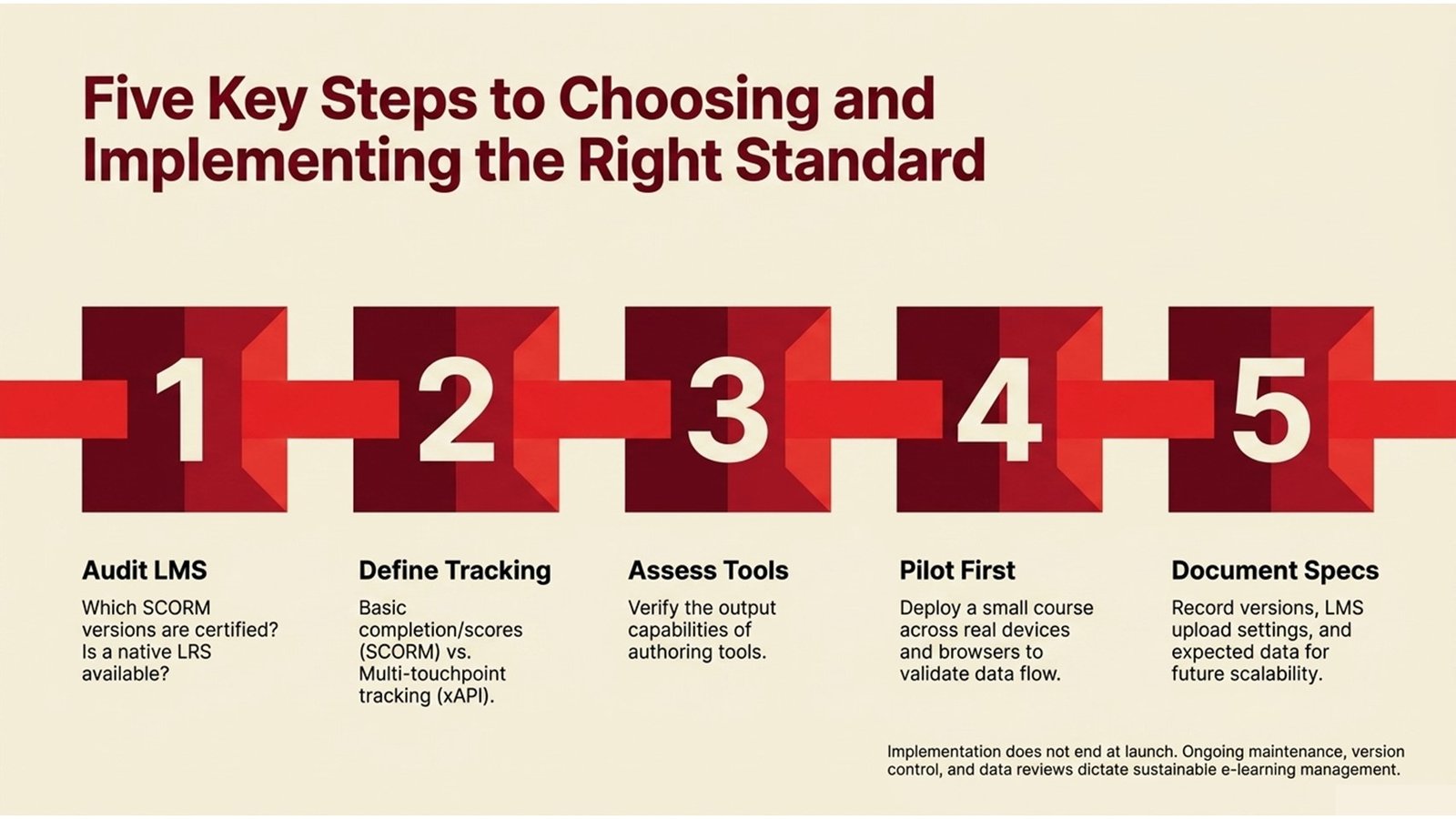
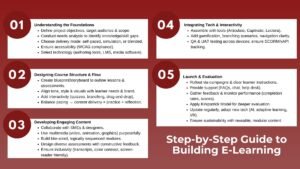
For those working on a new e-learning solution or re-developing an existing one, choosing between SCORM and xAPI can be tricky. These five steps can help with the decision-making process and subsequent implementation.
- Step 1: Audit your LMS capabilities
Prior to producing content, check the capabilities of your LMS. The majority of LMSs support SCORM 1.2 and SCORM 2004. Not as many have a built-in LRS for xAPI. Ask your LMS vendor which versions they are certified for and what fields they track and report on.
- Step 2: Define your tracking requirements
Determine what you want to track. If you simply want to track course completion and quiz scores, SCORM 1.2 will probably be enough. If you require learning information across a diverse range of touchpoints – mobile apps, blended learning, performance support – then xAPI will be worth the extra work.
- Step 3: Assess your authoring tool output
Authoring tools (for example, Articulate Storyline, Adobe Captivate, Lectora and Rise 360) have different support for SCORM and xAPI. Make sure your authoring tool will publish in the format you require, and test your tool’s output in your LMS before you begin to build your content.
- Step 4: Pilot before you scale
Create a pilot course in your chosen standard and test the course on your learners’ devices and browsers. Ensure completion, scoring and bookmarking work. This is especially important when administering LMS e-learning training content to a large, remote workforce.
- Step 5: Document your content specifications
Develop a content specification detailing your preferred standard, version of the authoring tool, LMS content upload settings, and the data generated. This document will be extremely helpful when onboarding new team members and vendors on future projects.
Table 2: SCORM Content Development Process Flow
| Stage | Activity | Output | Owner |
| 1. Analyse | Determine learning outcomes and data to be tracked | Content brief & data spec | Instructional Designer |
| 2. Design | Storyboard course & assessment logic | Storyboard document | ID + Subject Matter Expert |
| 3. Develop | Develop a course in an authoring tool; export as SCORM ZIP | SCORM package (.zip) | eLearning Developer |
| 4. Test | Staging LMS upload, tracking and completion tests | QA report | L&D Coordinator |
| 5. Deploy | Publish to live LMS; enrol target audience | Live course | LMS Administrator |
| 6. Review | Review course completion and scores; repeat if necessary | Data report + updates | L&D Manager |
Table 3: xAPI Implementation Process Flow
| Stage | Activity | Output | Owner |
| 1. Define | Map learning activities and statement vocabulary | xAPI statement design doc | Instructional Designer |
| 2. Configure LRS | Configure or Integrate Learning Record Store (LRS) with LMS | Active LRS endpoint | LMS / IT Administrator |
| 3. Develop | Create content with an xAPI authoring tool | xAPI-ready course files | eLearning Developer |
| 4. Test Statements | Check that actor-verb-object statements are being triggered | LRS data validation log | Developer + L&D Lead |
| 5. Connect Analytics | Connect LRS to the reporting tool / BI | Analytics dashboard | Data / L&D Analyst |
| 6. Scale | Provide to all learners; track data over a period of time | Ongoing data feed | L&D Manager |
Real-World Applications and Case Examples
While it’s easy to talk about these standards in theory, how do they work in practice? For example, an Australian retail organisation wanted to train more than 5,000 store assistants in 200 stores on a new product line. The L&D department had an LMS that supported SCORM and created a series of micro-courses (less than 15 minutes each) that were published as SCORM 1.2 packages. Completion and quiz scores and time-on-task were tracked through the LMS dashboard and made available to regional managers in near real time. The simplicity of SCORM ensured it was cheap to implement the technical side of things and easy to roll out in two weeks. This is precisely the type of use case that needs to be considered when comparing SCORM and xAPI e-learning: simplicity.
A different example is that of a German manufacturing company that was delivering a blended learning solution for its safety training. This involved online training, classroom facilitation, demonstration of equipment, and an app for on-the-job reference. None of these activities, other than the online modules, could be tracked using SCORM. The L&D team switched to using xAPI and installed a cloud-based LRS, along with their LMS. They created custom xAPI statements for each activity – such as check-ins at certain workstations and the quiz results from the mobile app – and were able to develop a profile of each learner that demonstrated if they had completed all the key components of the training. The information was then linked with their HR system to automatically issue a compliance certificate. This is a clear example of what it means to truly manage LMS e-learning content effectively in a complex, multi-modal learning environment.
The third example is that of a UK-based financial services organisation that was migrating its existing training library from an old LMS to a new one. This company had more than 800 SCORM courses, developed using multiple versions of two different authoring tools. During the migration process, they realised that 30% of the SCORM packages had not been re-tested since they were originally developed, and did not track properly on the new LMS due to differences in the LMS API. This highlights a common learning experience that many L&D teams face: development of e-learning content never stops. Content maintenance, version management, and re-testing are key components of a long-term content development strategy.
Challenges, Lessons Learned, and Making Standards Work for You
There are challenges with even established standards, such as SCORM. The most commonly reported problem is compatibility issues with the browser and LMS. While SCORM is generally supported, slight variations in how LMS vendors implement the SCORM API can result in completion data being lost, bookmarks not being saved, or quiz results not being recorded. This can be especially problematic for organisations that use an older version of an LMS or existing content developed using an older authoring tool. When designing a course based on SCORM and xAPI e-learning, be sure to test your course in the environment that learners will access the course – not just in the preview mode of the authoring tool.
For xAPI, the biggest issue is the setup process. With xAPI, you need to set up an LRS to collect data and define a set of verbs and activity types. This requires more initial planning and work. Organisations that do not take the time to develop a plan (especially the design of a project that defines what statements are to be tracked, and why) end up with an LRS full of data that is not consistent, or not of high quality, and therefore cannot be used for any analysis. The takeout message here is that xAPI is not a technology; it’s a data strategy. Think of it as such from the outset of your e-learning content development process, not an add-on.
Another common problem is a lack of stakeholder buy-in. L&D teams can often put in a lot of work to capture detailed xAPI data, only to find that line managers or business leaders don’t understand it or have access to the reporting systems to see it. Success stories combine technical expertise with communication skills – working with stakeholders at the start of the design process to understand what data is needed, and presenting it in a way that non-tech-savvy stakeholders can use to make decisions. The bottom line is that the purpose of any standard is not for its own sake, but so that your organisation can have the data it needs to manage your LMS e-learning content and to justify the investment in learning.
Table 4: SCORM vs xAPI — Feature Comparison at a Glance
| Feature | SCORM 1.2 | SCORM 2004 | xAPI |
| Browser required | Yes | Yes | No |
| Tracks offline learning | No | No | Yes |
| Mobile-friendly architecture | Limited | Limited | Yes |
| Requires LRS | No | No | Yes |
| Data richness | Basic | Moderate | Highly flexible |
| LMS compatibility | Universal | Broad | Varies |
| Setup complexity | Low | Medium | Medium-High |
| Best for | Formal courses | Sequenced curricula | Multi-modal tracking |
Conclusion: Actionable Insights for Learning Professionals
The SCORM and xAPI standards are not in competition; they are complementary standards that address different challenges at various stages of learning programme development. SCORM 1.2 is a good option for most organisations that are starting to establish a structured digital library of learning content. It’s familiar, straightforward to use and supported by all authoring tools and learning management systems (LMS). If you are simply looking to track course completion, gauge knowledge and report on compliance, SCORM will do the job.
If you are planning to design more complex learning programmes (such as blended learning, performance support tools, mobile learning and cross-system learning journeys), xAPI provides a greater level of sophistication than SCORM. The effort in setting up an LRS and crafting a meaningful vocabulary to describe statements is rewarded when you can, at last, make the connection between learning and performance. This is the difference between data being used reactively and to make a learning strategy.
If you’re new to the game, here are some things you can do today. First, read the SCORM and xAPI documentation on ADL’s (adlnet.gov) website – it is free, official and kept up-to-date. Second, if you have access to an LMS, locate and try the SCORM upload feature with a sample package from a free (or trial) authoring tool. Learning by doing is best. Third, when considering positions or projects, ask about standard use and what data is being collected – this will give you a good indication of where the organisation is in terms of its e-learning content development maturity. And lastly, whatever standard you choose, keep good documentation: you need to document your choices, test regularly and analyse your data.
Learning and development professionals tend not to be those who know all the ins and outs of all the standards. They are the ones who understand the importance of standards, can communicate technical ideas to non-technical audiences and are able to link learning data to business outcomes. Understanding the basics of SCORM and xAPI e-learning is a good start in developing that skill – and that begins with being familiar with the tools of the trade.